Read your results
Tone
Of the answers that name you, Tone is the share that speak about you positively. A fixed list of praise and criticism words decides each answer's tone. No AI judges it.
How it's calculated
Tone = answers naming you that read positive ÷ answers naming you × 100
Each answer that names you, by your business name or one of your aliases, gets one tone:
- remake keeps about 420 characters of the answer. That is the opening, or the stretch around your name when it appears further in.
- It counts the praise words and the criticism words in that stretch. A praise word with "not", "never" or a similar word in the 3 words before it counts as criticism.
- More praise than criticism reads positive. More criticism than praise reads negative. A tie, or no words from the list, reads neutral.
| Counts as praise | Counts as criticism |
|---|---|
highly recommend, trusted, affordable, reliable, best |
avoid, complaints, expensive, hidden fees, poor |
Answers that don't name you are left out, and so are answers that failed. The number reads your latest run, after the page's filters. Its change is the latest run minus the one before, in points.
Example
A run asks 12 prompts to 2 AI models, so 24 answers. 2 fail and drop out. 12 of the other 22 name you:
- 8 read positive: "a trusted, affordable tutor, though parking is limited" has 2 praise words and 1 criticism word.
- 3 read neutral: "a tutoring centre in Leeds" has no words from the list.
- 1 reads negative: "mixed reviews and complaints about hidden fees".
Tone = 8 ÷ 12 × 100 = 66.7, shown as 67% with "8 of 12 positive".
Reading it
Higher is better. The Tone info tip prints these bands:
| Tone | Band |
|---|---|
| 65% and up | Positive tone |
| 55% to 64% | Healthy |
| 45% to 54% | Warning |
| Below 45% | Crisis |
Neutral answers count in the total but never as positive. A run full of plain listings can lower Tone without a single word of criticism.
A word list reads words, not meaning. "Expensive but excellent" scores one each way, so it reads neutral. Read Tone as a trend over several runs.
What moves it
- Correcting the wrong claims answers make about you, on your own site.
- Answering common complaints on your site: prices, fees, waiting times.
- Fresh positive reviews on the sites AI answers lean on. See Sources.
Where to find it
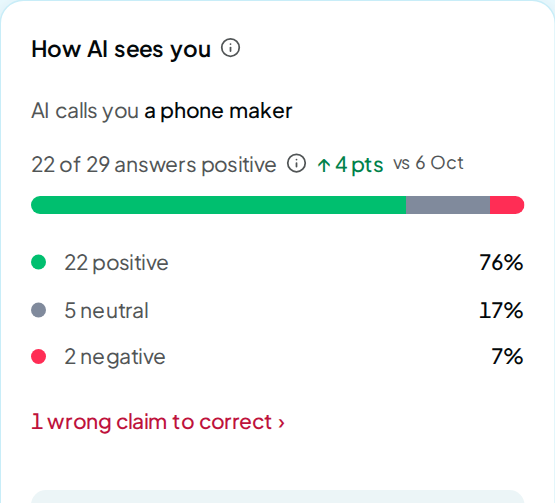
The Tone tile sits on Overview and Insights. On Overview, the How AI sees you card shows the same answers as "8 of 12 answers positive". On Insights, pick Tone in the trend card to chart it.
Perception is the page built around Tone. Its filters narrow the cards by time window, AI model and Topic, plus Location when your prompts name places. The Market tab holds these cards:
| Card | What it shows |
|---|---|
| How AI describes you | How the answers describe your business, beside your Tone |
| Tone over time | Each brand's Tone at every run in the window |
| Tone vs rivals | Each brand's Tone in the latest run, highest first |
| Words AI attaches to you | The phrases said most often in answers naming you, with their tone |
| Tone by AI model | Your Tone in each AI model's answers |
| How rivals are described | The words the answers use for each rival |
| Tone by topic | Your Tone in each topic; a topic with too few answers shows a dash |
| Where AI is critical | Answers naming you in a critical tone, latest first |
| Wrong claims | Claims the answers made that contradict your facts |
The Fact-checking tab compares the answers with facts you give. Type up to 40 facts in Your facts, one per line, then click Save facts. Each run compares the answers with them.
Claims AI got wrong marks each claim Contradicts your facts, or Not run when no saved fact covers it. Correct this with your AI › opens the claim's row under Corrections on Improve.
Opening Perception costs nothing. It reads runs you already have. Open Perception.
FAQ
Does an AI decide my Tone?
No. The word list scores each answer, so the same answer always gets the same tone. The description, the rival descriptions and the wrong claims come from an AI read made during each run.
Why does Perception show a dash instead of a percentage?
Fewer than 10 answers naming you have been scored. Until then the count shows beside the ring, such as "2 of 3 mentions". The Tone tile on Overview and Insights shows the percentage with its count.
Is the tone on my report the same number?
No. The report's Overall score has a "Brand tone" part, which comes from an AI read of the answers. Tone on Perception, Overview and Insights comes from the word list.
How is a rival's Tone read?
The same way, from the same stretches of text. When an answer names you, its stretch sits around your name. A rival's Tone in that answer reflects the words near you.