Read your results
My website
My website shows how well AI can read your site, which of your pages AI answers link to, and the visits those answers send. Opening it is free; it reads your stored runs.
Open it
Open a brand, then My website in the sidebar, under Overview. The header shows your site's address and when the last run finished.
The time window at the top, 7D, 30D, 3M or Custom, sets the range for the charts and the cited pages. Reset view brings back the default. The score card and the site checks always read your latest run.
Is your website AI-friendly
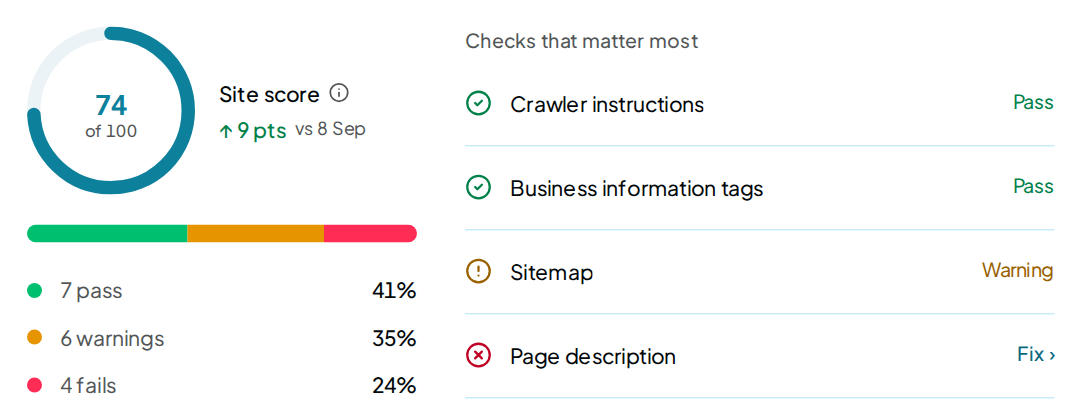
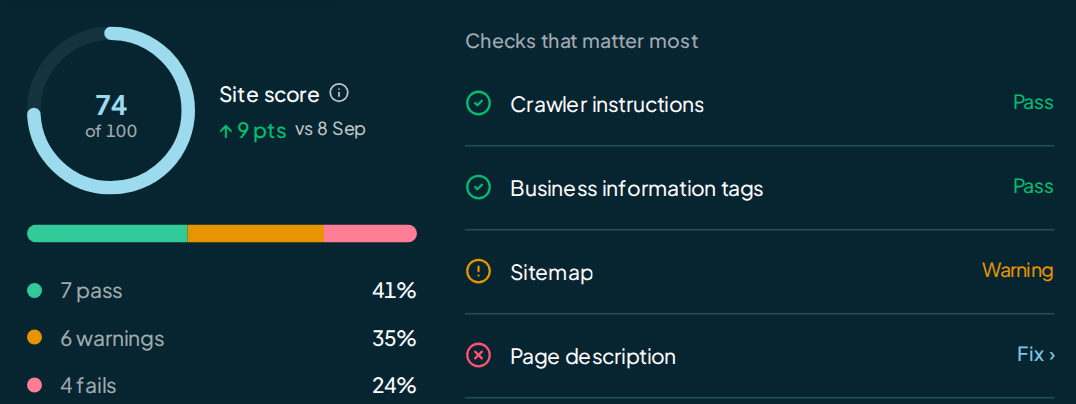
The top card shows your Site score out of 100, with its change since the last run. Beside it sit the Checks that matter most: 8 checks, each a pass, a warning or a fail.
The card names your site's platform when the check could tell. The link under it opens the full list of checks further down.
If your site blocks automatic reading, a notice above the card says each visit adds an unblocking charge.
The cards
| Card | What it shows | Where it leads |
|---|---|---|
| Is AI citing your website | Per AI model, the share of answers that linked to your site in the latest run | View AI models in Insights |
| Google results | Google Search clicks on cited pages and visits sent by tracked AI assistants, from your connected Google accounts | Connections below |
| Your most cited pages | Every page of yours that AI answers linked to in the window, with the AI models that cited it and the prompts behind it | View sources in Insights |
| Site score over time | Your Site score at each run, with the runs where a fix was first seen live | View Improve |
| AI visitors | People who reached your site from an AI answer, once the snippet is on your site | Set up the visitor counter, or View AI referrals |
| Pages AI cites instead | Other sites' pages the answers linked to, with their share | View sources in Insights |
| All site checks | Every website check from the latest run, fails first | View Improve |
In All site checks, each row shows its result and what the check found. Every check that fails or is almost there carries Improve ›. It opens that check's own row on Improve.
In Pages AI cites instead, Get listed › opens that site's row. Click Let AI crawlers read your site to open the AI bots your robots.txt speaks to; see Website checks.
Site score over time needs 2 runs before it draws a line.
Your most cited pages
The card spans the full width of the page. Its line reads like "Last 30 days · 14 runs · 37 pages": the window, the runs it read and your pages cited.
| Column | What it shows |
|---|---|
| Page | The page's address on your site. The arrow beside it opens the page. |
| Times cited | Answers that linked to the page. Each answer counts a page once. |
| AI models | A logo for each AI model that cited it |
| Since last run | The move since the run before: up, down, New, or 0 for no change. A dash means there was no run before. |
| Last cited | The last day an answer linked to it |
The card shows 8 pages first; Show all lists the rest. Click a row to open it in place:
- Questions that led here: each prompt whose answers linked to the page, with the AI models and a count. A tracked prompt links to its own page.
- First cited in window, Last cited and Share of links.
When your pages sit in more than one folder, Folders groups them by the first part of the address, such as /blog. Pages lists them one by one.
The card reads every run in the window, up to the newest 100. Past that, its line says "newest 100 runs". It costs nothing to open.
AI referrals
The AI referrals card counts visits that arrived from a link in an AI answer. It shows this week's count against last week, split by AI model.
Before it can count, the card offers Generate snippet: one line of code to paste before </head> on your site. Reset key makes a new line and stops the old one counting. The snippet sets no cookies and stores nothing about the visitor.
AI models send few visits today, so expect small numbers. See Website data for the setup.
Connections
The Google results card shows the figures. Connections links your Google accounts and shows each account's state, property and Connect, Reconnect or Disconnect button.
| Connection | What it adds here |
|---|---|
| Google Search Console | Google Search clicks reported for pages cited in remake checks. These clicks may come from ordinary Google results; they do not prove an AI answer sent a visitor. |
| Google Analytics | Visits from tracked AI assistants to this website, by assistant. This figure is separate from remake's visitor counter. |
Both read the last 28 full days, ending 2 days ago. The card shows the exact dates. Connecting is free and changes nothing in your Google account.
See Website data for setup and limits.
When the page is empty
Before the first run, the page reads Your site hasn't been checked yet and offers Go to Budget & Spending. Google Analytics can still show visits; a run is needed to compare cited pages with Google Search. Start one there, or with Run now.
If no run falls in the time window, the charts say so. Pick a longer window or Reset view.
FAQ
Does opening My website use credit?
No. It reads runs you already paid for. See what costs credit.
Why is Is AI citing your website at 0% when answers name me?
An answer can name you without linking to your site. This card counts links only. See Sources.
Why does a check here differ from Improve?
The site checks read your latest run. On Improve, a website change that a later check confirmed live wears the green tick and sits in History, whatever the run's result was.