API
Webhooks
A webhook sends a JSON POST to your own URL when a number you watch moves. It also fires when a scheduled run fails, a fix re-check finishes, or a check you started through the API or MCP ends.
Where webhooks come from
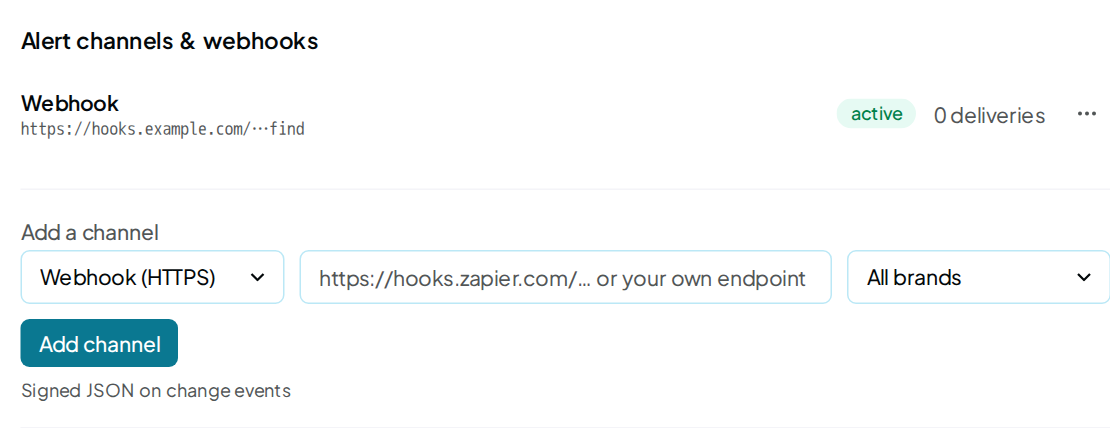
Every webhook is an alert channel. You add one in the app, on the Alerts tab of Integrations.
- In the Alert channels & webhooks card, under Add a channel, pick Webhook (HTTPS).
- Paste your endpoint. It must start with
https://and be a public address of your own service. Private network addresses and our own addresses are refused. - To hear from one brand only, pick it in the scope menu. The default is All brands.
- Click Add channel.
- In the new channel's row menu, click Send test.
Viewer seats cannot add channels. Email alerts and the weekly Slack digest sit on the same tab, as Alerts explains.
When events are sent
The four change events and scan.failed come from a brand's scheduled runs. That means each scheduled run,
plus each Run now from the app, the API or MCP. Each run is compared
with the brand's previous finished run.
- A brand's first run sends no change events. There is no earlier run to compare it with.
- One run sends at most 4 change events.
- Bulk run, pitches and Run new prompts only send none.
scan_complete is separate. A Run now started through the API or MCP sends it when the run finishes or fails.
It needs no earlier run, and a run started in the app never sends it.
It goes to the plain webhook channels of the account that owns the key. Slack, Discord, Teams and email channels do not get it. A channel limited to one brand hears only that brand.
A failed run sends scan.failed to the channels that hear change events. It also sends scan_complete with status set to failed.
Events
event |
Sent when | payload fields |
|---|---|---|
visibility.moved |
This run's Visibility differs from the previous run's, by any amount | prev_rate, rate, delta, mentions, asked |
score.moved |
The Overall score moved by 5 points or more | prev_score, score, delta |
rival.top3 |
A rival entered the top 3 recommended. One event per rival; ignored rivals never fire it | name |
ai_model.first |
An AI model named you this run, after naming you in none of its answers the run before | ai_model, label, mentions, asked |
scan.failed |
A scheduled run failed | scan_id, error |
scan_complete |
A Run now started through the API or MCP finished or failed | scan_id, token, status, score, error |
fix.verified |
A fix re-check finished, started from a shared report or by an AI assistant, including the check remake runs when the assistant reports a change made | live, total, scan_id, domain |
test |
Someone clicked Send test on the channel | test |
What each payload field holds:
| Field | Meaning |
|---|---|
prev_rate, rate |
Visibility in the previous run and in this run, in whole percent |
delta |
This run minus the previous one, in points |
mentions, asked |
Answers that named you, out of the answers that came back. For ai_model.first, that AI model's answers only |
prev_score, score |
The Overall score in the previous run and in this run, 0 to 100 |
name |
The rival's name |
ai_model, label |
The AI model's id, and its name as the app shows it |
scan_id |
The run's numeric id, as the runs list returns it |
token |
The run's token: the run_id the Run now answer gave, and the token the runs list shows |
status |
done or failed |
error |
Why the run failed, up to 120 characters (up to 200 for scan_complete) |
live, total |
Fixes found live on the site, out of the fixes run |
domain |
The brand's website |
test |
Always true |
Body
Every event arrives in the same envelope. The body is sent on one line; it is spread out here to read.
{
  "event": "visibility.moved",
  "title": "Visibility up 15 pts",
  "detail": "40% of answers named you last run; 55% this run (33 of 60 answers).",
  "domain": "samsung.com",
  "occurred_at": "2026-10-07T07:08:51+00:00",
  "payload": {"prev_rate": 40, "rate": 55, "delta": 15, "mentions": 33, "asked": 60}
}
| Field | What it holds |
|---|---|
event |
The event name, from the table above |
title |
A one-line summary |
detail |
One sentence with the numbers |
domain |
The brand's website. Empty for test |
occurred_at |
When the run behind the event finished, in UTC. For fix.verified, that is the run whose fixes were re-checked, not the re-check itself. For test, when the button was clicked |
payload |
The event's own fields |
Headers
| Header | Value |
|---|---|
Content-Type |
application/json |
X-HyperFind-Signature |
sha256= followed by the lowercase hex HMAC-SHA256 of the raw body |
Each Webhook channel signs with its own secret. The app does not display that secret. No timestamp or delivery id header is sent.
The signature header name is a fixed technical name, so checks you already wrote keep working.
Delivery and retries
- Each attempt is one POST. It waits up to 10 seconds for each part of the answer, and 20 seconds in all.
- Any status from 200 to 299 counts as delivered.
- Redirects are not followed. One counts as a failed attempt, so use the final URL.
- A status of 300 or above, or no answer in time, is a failed attempt.
- A failed attempt is retried twice: after 2 seconds, then after 8 seconds.
- After 3 failed attempts, that event is not sent again.
- After 5 failed deliveries in a row, the channel stops and its pill reads paused.
To restart a paused channel, remove it and add the same URL again. Answer quickly: a reply slower than 10 seconds triggers a retry, so the same event can arrive twice.
The Delivery log on the same tab lists the newest 20 deliveries across your channels. It shows the time, the channel, the event, the status (sent, failed or dead) and the tries. Removing a channel deletes its log.
Slack, Discord and Teams
Paste a chat app's incoming-webhook URL with Webhook (HTTPS) picked. remake recognises the address and sends that app's own message format. The channel row then reads Slack, Discord or Teams.
| Address | What arrives |
|---|---|
Any slack.com address, such as https://hooks.slack.com/… |
A Slack message: the title in bold, the detail, then the website and time |
A discord.com or discordapp.com address containing /api/webhooks |
A Discord message: the title, plus an embed with the event name and the detail |
A Microsoft Teams workflow address (workflow.office.com or Power Automate) |
A Teams card: the title, the detail, the website and the time |
These messages carry the title and detail, not the JSON envelope, and no signature header. For one weekly summary in Slack, use the Slack digest card on the same tab.
When a run finishes
A Run now you start through the API or MCP sends scan_complete when it ends. Other runs send events only when a number moved or they failed. A fix re-check sends fix.verified.
A slow reply can make an event arrive twice, as Delivery and retries explains.
Store each token you have handled, and skip a repeat.
To follow a run yourself, poll
GET /v1/brands/{brand}/runs/{run_id} until status is done or failed.
API recipes has a working loop.
Zapier and Make
Both receive events through a Webhook channel. The Zapier and Make pages cover the setup on their side.
FAQ
Can I get an event when a run finishes?
Yes, for a Run now started through the API or MCP. It sends scan_complete.
Other runs send events only when a number moved or they failed, and a fix re-check sends fix.verified.
Poll those, as API recipes shows.
Why did my first run send nothing?
Each event compares a run with the brand's previous run. A brand's first run has nothing to compare with, so it sends no change events.
My channel says paused. How do I turn it back on?
Remove the channel, then add the same URL again. A channel pauses after 5 failed deliveries in a row, so check the Delivery log for the failing status first.
Do webhooks use my credit?
No. Sending events spends nothing from your wallet. The runs behind them are charged as usual.
Related
Manage your channels in Integrations › Alerts.