Set up and tune
Run now
Run a brand once, straight away, instead of waiting for its next scheduled run. Or ask only the prompts you added since the last run.
Before you start
- A brand with a schedule. See Schedules.
- A country picked for the brand. See Brand settings.
- At least one active prompt.
- Enough credit in your wallet for one run.
- The account owner's sign-in. A Viewer can't start runs.
Start a run now
- Open the brand's Prompts page or its Budget & Spending page.
- Click Run now. The button shows the price of the run.
- Read the dialog: how many prompts, which AI models, the Price, and the date your next scheduled run moves to.
- Click Run now in the dialog to start.
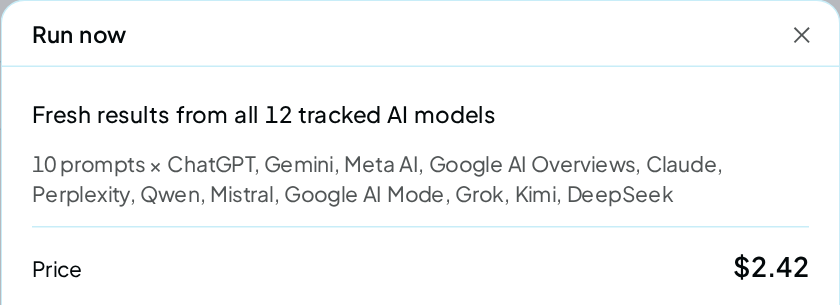
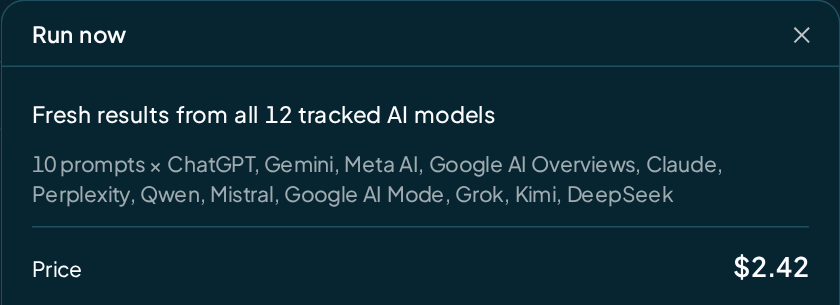
A message confirms the run started, with the date of your next scheduled run. A typical run takes 3 to 6 minutes.
A run started now takes the place of your next scheduled one. Your schedule moves one interval on from today, so you never pay twice for the same slot.
You are charged as the run asks, one answer at a time. If the price changed since the dialog opened, it shows the new price and asks you again. Nothing is charged until you agree.
What it costs
The same as one scheduled run: your active prompts on every AI model in your set, plus the fixed part of each run. For example, 25 prompts on Standard cost $1.13.
If the brand has no fix suggestions yet, this run writes them and adds $0.25 once. See Runs and the price card.
Ask only new prompts
Run new prompts only asks the prompts that have never been asked, and adds their answers to your latest run. Use it after adding prompts, when you don't want to wait or pay for a full run.
- On Prompts or Budget & Spending, click Run new prompts only. It shows only when you have new prompts.
- Read the dialog: how many new prompts, which AI models, and the Price.
- Click Run new prompts only in the dialog.
You pay for the new prompts on each AI model, plus one answer-scoring step. Your site is not read again, and your schedule stays as it is. For example, 5 new prompts on Standard cost $0.23.
The Prompts page also shows a banner when new prompts haven't been asked yet. It offers both buttons.
When the button is off
Hover over a greyed-out button to see why.
| The tip says | What to do |
|---|---|
| Set up Budget & Spending first | Set up a schedule |
| A run is already going | Wait for this brand's run to finish |
| No prompts are tracked | Turn on at least one prompt on the Prompts page |
| Your balance can't cover one run | Top up your wallet |
| This month's budget is reached | Raise the monthly cap, or wait for next month |
| The schedule is paused | Click Resume on Budget & Spending |
| Too many runs are waiting | Up to 3 runs can be queued or running per account. Wait for one to finish. |
| Every prompt has already been asked | Run new prompts only has nothing new to ask |
| Run the whole brand once first | Start a full Run now before asking only new prompts |
A brand with no country yet opens Pick your country first instead. Click Go to Brand settings, pick the country, then come back and press Run now again.
Check it worked
- The Prompts page shows Running now with the number of prompts being asked.
- The bell at the top of the app tells you when the run is done.
- When it finishes, the Overview header shows the new run's date.
- Your wallet lists the charges as Run usage rows.
FAQ
Is a run started now different from a scheduled one?
No. It asks the same prompts of the same AI models, and its results land in the same places.
Does Run now cost extra?
No. It costs the same as a scheduled run, and it takes the next scheduled run's place.
What if the run fails?
You pay only for the answers that came back. Answers that fail on our side are refunded. See Runs.
Can I run all my brands at once?
Up to 3 at a time. Start each brand's run from its own page; up to 3 runs can be queued or running per account.
Past that, Run now is refused and nothing is charged. A scheduled run that comes due then waits and starts in turn as other runs finish.